The Neuro Player System gives players progression across the BrainAssistant games: Neuro Coins earned in one game, for example Focus Master, buy new spaceships in Space Adventure or new race cars in NeuroRacer.
Neuro Coins
Neuro Coins are the currency of the Neuro Shop. Players earn them in the neurofeedback games as continuous gratification, as special pickups or as rewards for maintaining good feedback. All coins of a client are added up across the games.
| Coin | Value |
|---|---|
| Neuro Coin (blue) | 1 Neuro Coin |
| Gold Coin | 100 Neuro Coins |
| Ruby | 100 Gold Coins = 10,000 Neuro Coins |
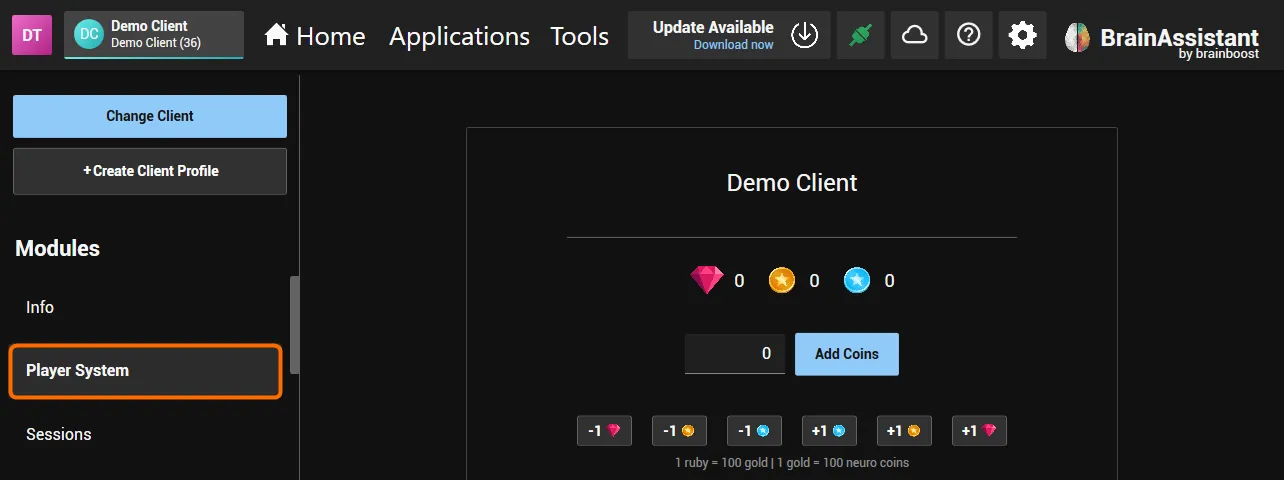
A player’s coins are shown in the Neuro Coin panel of the Brain HUD and in the Player System module of the client profile in BrainAssistant (click the client’s name, top left). There the trainer adds coins (number field and Add Coins) or adds and removes one Ruby, Gold Coin or Neuro Coin with the +1 and -1 buttons. Steps: Neuro Player System.
Neuro Shop
Each neurofeedback game contains the Neuro Shop, where players unlock new content with their coins. The items differ from game to game and range from new vehicles and player characters to new game environments or temporary boosts. Temporary boosts are generally helpful, but in most games player characters and environments do not affect the gameplay itself, so the games stay accessible to everyone.