
Players earn Neuro Coins in the BrainAssistant games and spend them in the Neuro Shop of every game. The coin types, their values and the Neuro Shop are described on the feature page Neuro Player System.
Adjust a client’s coins
-
In the main menu, click the client’s name (top left) to open the client’s modules.
-
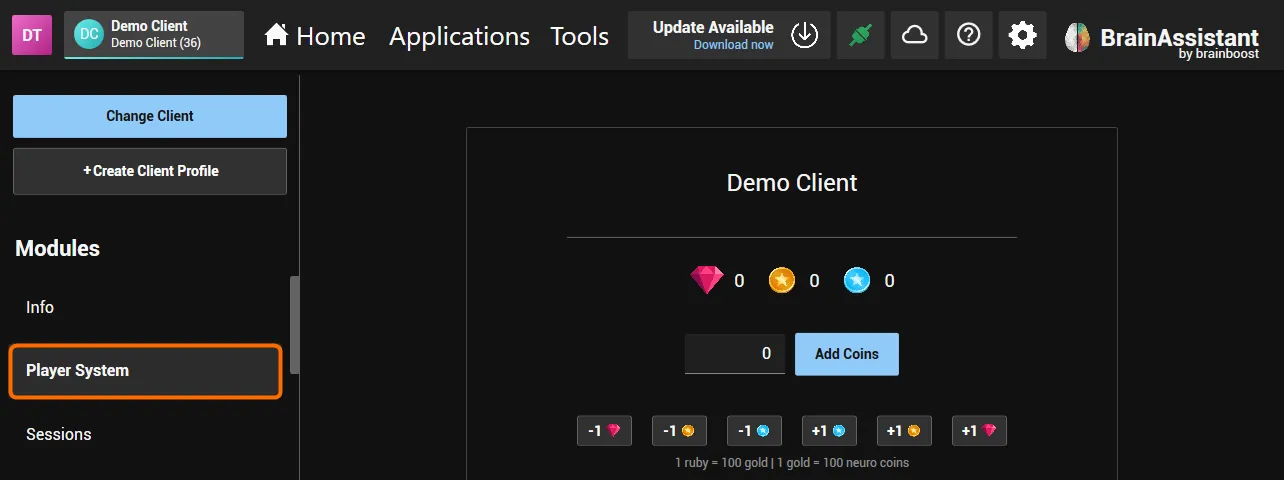
Open Player System. It shows the client’s Rubies, Gold Coins and Neuro Coins.
-
To add coins, enter the number of Neuro Coins and click Add Coins (or press Enter).
-
To add or remove single coins, click the +1 or -1 button with the Ruby, Gold Coin or Neuro Coin icon (1 Ruby = 100 Gold Coins, 1 Gold Coin = 100 Neuro Coins).
The client’s other modules are described in Add, search and remove clients.