
This page shows how to set the feedback thresholds in a session and which values work well. What each threshold option does is described in Automatic thresholds.
Total success and aim success
The total success determines how much positive or negative feedback the client receives during the session. It results from the success of every bar, so you adjust it indirectly, through the (aim) success of each bar.
The (aim) success of a bar is set with its threshold. Depending on the training direction of the frequency band, raising or lowering the threshold makes it harder or easier for the client to achieve success.
Overview
Each bar (e.g. Theta, Alpha, SMR, High Beta) has a detailed overview with all relevant information.
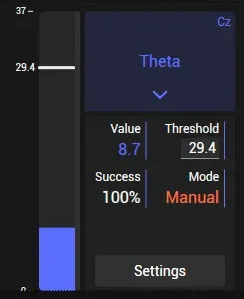
All information about the feedback bars can be found here:
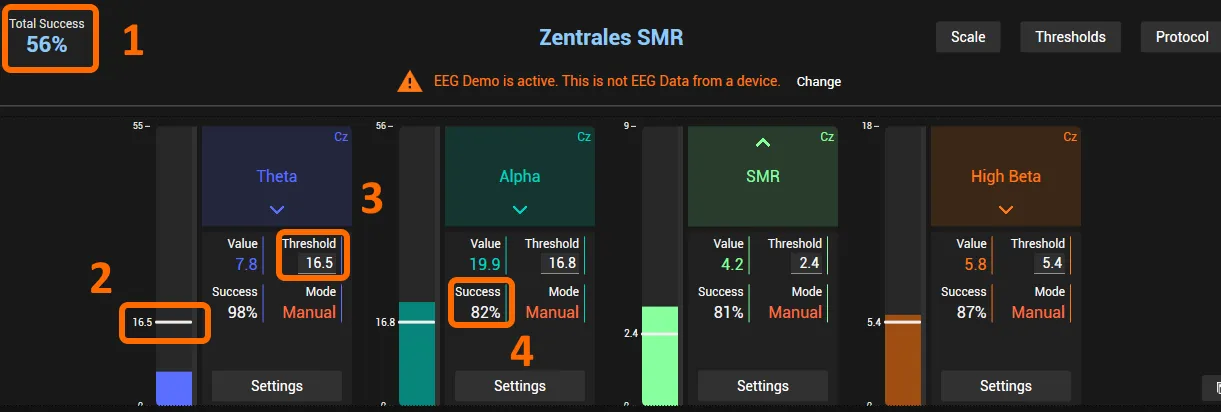
(1) The total success should ideally lie between 50 and 60%. This may vary depending on the game and the client’s frustration tolerance:
- 50 to 55% suits clients with a balanced frustration tolerance.
- 55 to 60% suits clients with a lower frustration tolerance.
To adjust the total success, configure the success of each bar: every frequency band contributes equally to the total success.
An approximate formula for the total success with four frequency bands (four bars): 85%^4 ≈ 52%.
Each bar contributes equally to the total success, so to influence it you adjust the threshold of each bar. As a rule of thumb, 83 to 85% per bar results in a total success of about 52 to 55%. This may vary depending on how volatile the frequency bands (bars) are.
Manual threshold adjustment
Refer to the numbers in the screenshot above.
(2) If the threshold mode is set to Manual, you can adjust the threshold, and with it the (aim) success, by left-clicking into the bar. The threshold jumps to the clicked position.
(3) You can also use the + and − buttons to adjust the threshold. These buttons appear when you hover over the field.
(4) This shows the individual success rate of each bar, the (aim) success.
Automatic threshold setting
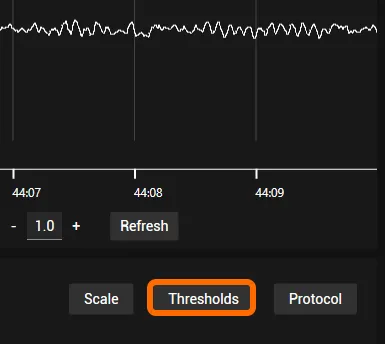
To activate automatic thresholds, click Thresholds on the right below the raw EEG.
The Threshold Settings window opens.
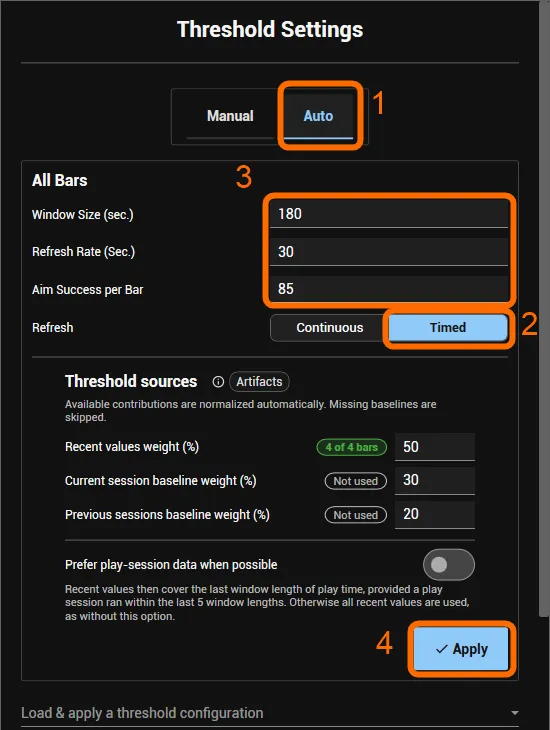
- Click Auto.
- Next to Refresh, click Timed, so the threshold is updated only once per refresh rate. We usually do not recommend Continuous.
- Enter the values (as shown in the screenshot):
- Window Size (sec.): 180 to 300 seconds are recommended.
- Refresh Rate (Sec.): with 30, for example, the threshold is updated only once every 30 seconds. The right value varies a lot with the client and the training protocol; for a typical eyes-open training focused on Cz, 30 to 60 seconds is a good guideline.
- Aim Success per Bar: when training four frequency bands, 85% on all four bars is generally a good reference; different protocols or your client’s behaviour may call for other values.
- Click Apply. Before a new game or session, Reset threshold and success calculation clears the values collected so far, so that artifacts (e.g. from talking between the games) do not influence the automatic threshold calculation too much.
Additional settings
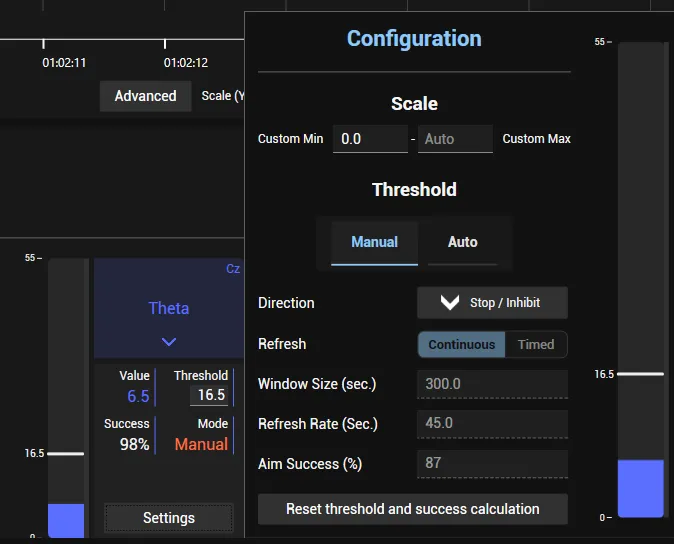
To set a single bar differently, click Settings at the bottom of the bar’s field. There you switch its threshold mode between Manual and Auto, change its direction and enter its own automatic threshold values.
Example configurations
Theta is the only frequency band set to Manual:
Here, only High Beta uses an automatic threshold:
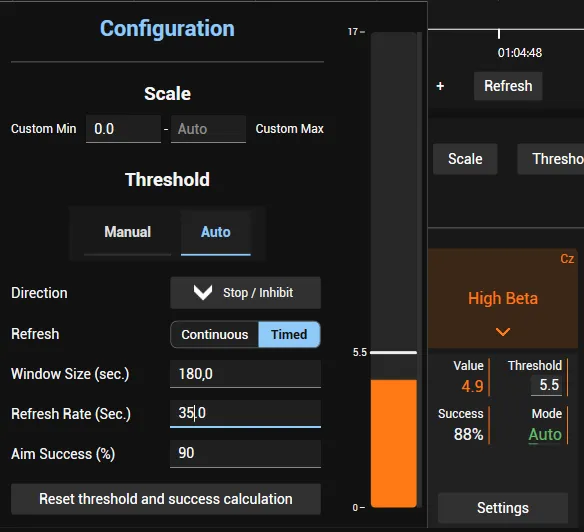
The threshold for High Beta stays fixed for 35 seconds before it updates again, then stays fixed for another 35 seconds. The last 3 minutes (180 seconds) are used for the threshold calculation, and the aim success for High Beta alone is set to 90%.